
'%3e%3cpath%20d='m19.6%2066.5%2019.7-11%20.3-1-.3-.5h-1l-3.3-.2-11.2-.3L14%2053l-9.5-.5-2.4-.5L0%2049l.2-1.5%202-1.3%202.9.2%206.3.5%209.5.6%206.9.4L38%2049.1h1.6l.2-.7-.5-.4-.4-.4L29%2041l-10.6-7-5.6-4.1-3-2-1.5-2-.6-4.2%202.7-3%203.7.3.9.2%203.7%202.9%208%206.1L37%2036l1.5%201.2.6-.4.1-.3-.7-1.1L33%2025l-6-10.4-2.7-4.3-.7-2.6c-.3-1-.4-2-.4-3l3-4.2L28%200l4.2.6L33.8%202l2.6%206%204.1%209.3L47%2029.9l2%203.8%201%203.4.3%201h.7v-.5l.5-7.2%201-8.7%201-11.2.3-3.2%201.6-3.8%203-2L61%202.6l2%202.9-.3%201.8-1.1%207.7L59%2027.1l-1.5%208.2h.9l1-1.1%204.1-5.4%206.9-8.6%203-3.5L77%2013l2.3-1.8h4.3l3.1%204.7-1.4%204.9-4.4%205.6-3.7%204.7-5.3%207.1-3.2%205.7.3.4h.7l12-2.6%206.4-1.1%207.6-1.3%203.5%201.6.4%201.6-1.4%203.4-8.2%202-9.6%202-14.3%203.3-.2.1.2.3%206.4.6%202.8.2h6.8l12.6%201%203.3%202%201.9%202.7-.3%202-5.1%202.6-6.8-1.6-16-3.8-5.4-1.3h-.8v.4l4.6%204.5%208.3%207.5L89%2080.1l.5%202.4-1.3%202-1.4-.2-9.2-7-3.6-3-8-6.8h-.5v.7l1.8%202.7%209.8%2014.7.5%204.5-.7%201.4-2.6%201-2.7-.6-5.8-8-6-9-4.7-8.2-.5.4-2.9%2030.2-1.3%201.5-3%201.2-2.5-2-1.4-3%201.4-6.2%201.6-8%201.3-6.4%201.2-7.9.7-2.6v-.2H49L43%2072l-9%2012.3-7.2%207.6-1.7.7-3-1.5.3-2.8L24%2086l10-12.8%206-7.9%204-4.6-.1-.5h-.3L17.2%2077.4l-4.7.6-2-2%20.2-3%201-1%208-5.5Z'/%3e%3c/svg%3e)
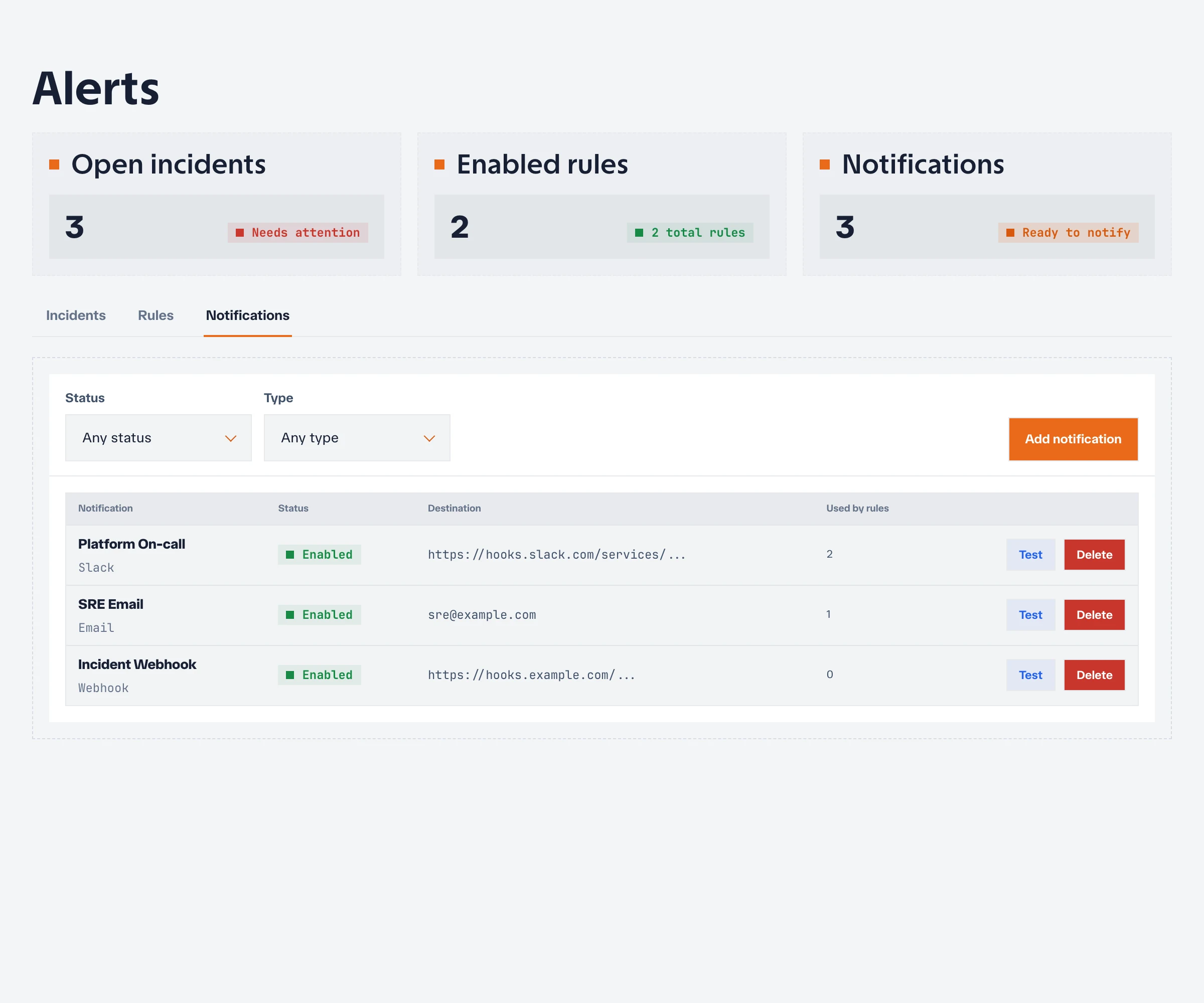
Notification destinations deliver alert and incident changes to external systems. Destinations belong to a project and can be reused by multiple alert rules.
Destination types
| Type | Typical use |
|---|---|
| Webhook | Send structured events to an automation or incident platform |
| Slack | Post incidents to a Slack channel through an incoming webhook |
| Discord | Post incidents to a Discord channel through a webhook |
| Telegram | Send messages through a Telegram bot |
| Deliver messages through the instance SMTP configuration |
Create a destination
- Open Alerts, then open Notifications.
- Choose Add notification.
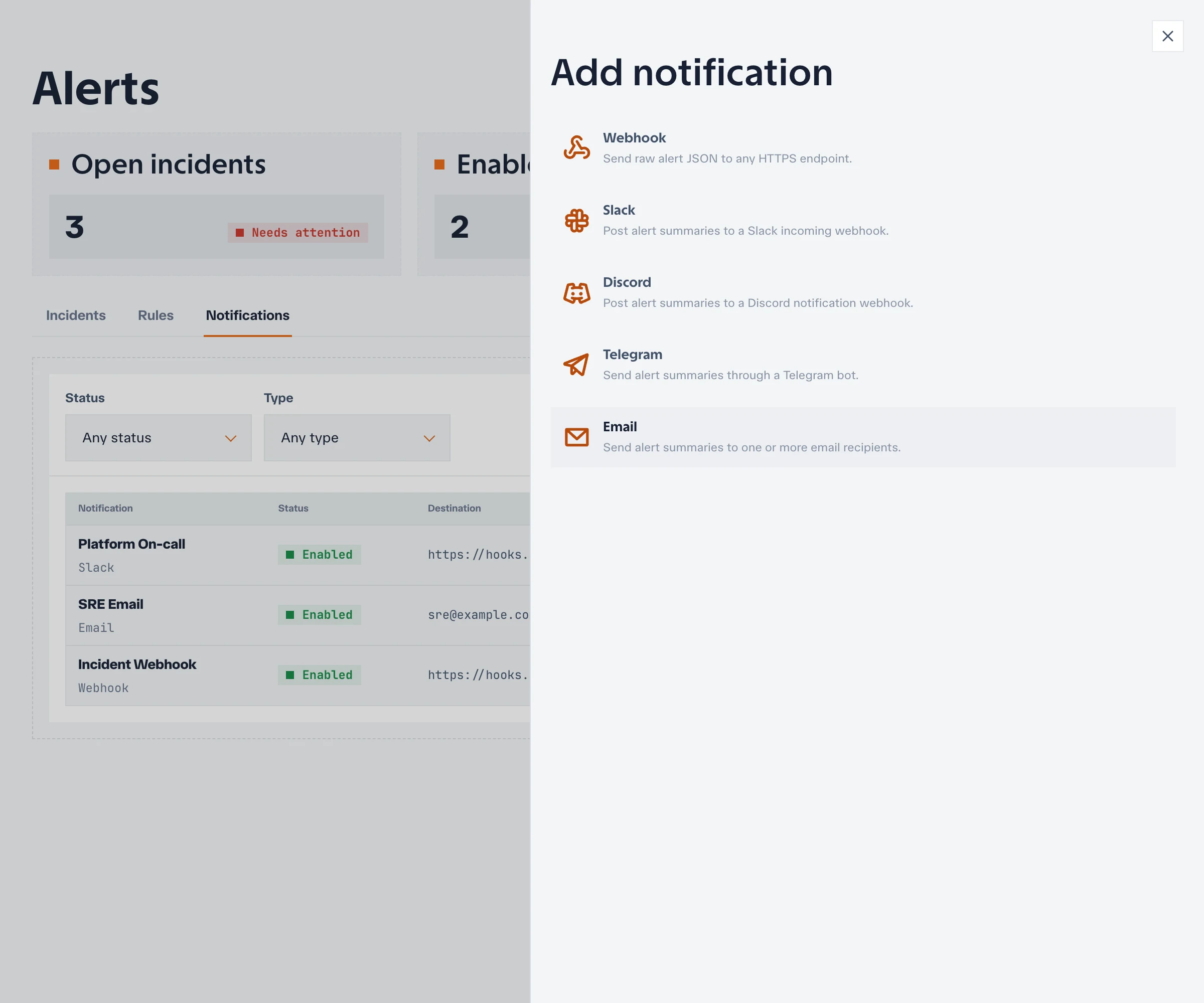
- Select a type and enter the required endpoint, token, chat, or recipient details.
- Save the destination.
- Send a test notification.
Test before attaching the destination to production rules. A saved configuration only proves that its fields were accepted; a successful test verifies network access and the external credentials.
Attach destinations to rules
Edit an alert rule and select one or more notification destinations. A destination can be attached to multiple rules, so use names that identify both the service and audience, such as slack-platform-oncall.
Review rule severity and destination audience together. Not every warning needs to page the same channel used for critical incidents.
Email requirements
Email destinations require working instance-wide SMTP configuration. If email tests fail, a system administrator should first verify the SMTP host, port, credentials, sender address, encryption mode, and controller logs.
See Authentication and email for SMTP setup.
Handle secrets
Webhook URLs, bot tokens, and SMTP credentials are secrets. Restrict who can edit destinations, avoid exposing values in screenshots or support bundles, and rotate them when access changes or a value may have leaked.
The application may mask a stored secret after it is saved. A masked value means the secret is retained; it is not a recoverable copy to share with another administrator.
Troubleshoot delivery
If a test or incident notification is not delivered:
- Confirm that the destination is enabled and its test succeeds.
- Confirm that the alert rule has the destination selected.
- Check the controller logs near the delivery time.
- Verify outbound DNS and HTTPS or SMTP access from the controller.
- Check external rate limits, channel permissions, recipient filters, and spam handling.
- Rotate or re-enter the credential if the provider reports it as invalid.
A resolved incident may produce a separate recovery notification. Test both firing and recovery handling in downstream automation.
Next, attach the tested destination to an alert rule.