
'%3e%3cpath%20d='m19.6%2066.5%2019.7-11%20.3-1-.3-.5h-1l-3.3-.2-11.2-.3L14%2053l-9.5-.5-2.4-.5L0%2049l.2-1.5%202-1.3%202.9.2%206.3.5%209.5.6%206.9.4L38%2049.1h1.6l.2-.7-.5-.4-.4-.4L29%2041l-10.6-7-5.6-4.1-3-2-1.5-2-.6-4.2%202.7-3%203.7.3.9.2%203.7%202.9%208%206.1L37%2036l1.5%201.2.6-.4.1-.3-.7-1.1L33%2025l-6-10.4-2.7-4.3-.7-2.6c-.3-1-.4-2-.4-3l3-4.2L28%200l4.2.6L33.8%202l2.6%206%204.1%209.3L47%2029.9l2%203.8%201%203.4.3%201h.7v-.5l.5-7.2%201-8.7%201-11.2.3-3.2%201.6-3.8%203-2L61%202.6l2%202.9-.3%201.8-1.1%207.7L59%2027.1l-1.5%208.2h.9l1-1.1%204.1-5.4%206.9-8.6%203-3.5L77%2013l2.3-1.8h4.3l3.1%204.7-1.4%204.9-4.4%205.6-3.7%204.7-5.3%207.1-3.2%205.7.3.4h.7l12-2.6%206.4-1.1%207.6-1.3%203.5%201.6.4%201.6-1.4%203.4-8.2%202-9.6%202-14.3%203.3-.2.1.2.3%206.4.6%202.8.2h6.8l12.6%201%203.3%202%201.9%202.7-.3%202-5.1%202.6-6.8-1.6-16-3.8-5.4-1.3h-.8v.4l4.6%204.5%208.3%207.5L89%2080.1l.5%202.4-1.3%202-1.4-.2-9.2-7-3.6-3-8-6.8h-.5v.7l1.8%202.7%209.8%2014.7.5%204.5-.7%201.4-2.6%201-2.7-.6-5.8-8-6-9-4.7-8.2-.5.4-2.9%2030.2-1.3%201.5-3%201.2-2.5-2-1.4-3%201.4-6.2%201.6-8%201.3-6.4%201.2-7.9.7-2.6v-.2H49L43%2072l-9%2012.3-7.2%207.6-1.7.7-3-1.5.3-2.8L24%2086l10-12.8%206-7.9%204-4.6-.1-.5h-.3L17.2%2077.4l-4.7.6-2-2%20.2-3%201-1%208-5.5Z'/%3e%3c/svg%3e)
A project keeps a monitoring environment and its collaborators together. Probes, checks, alert rules, notification destinations, incidents, and status pages all belong to a project.
Create a project
Open the project switcher and choose Create project. Give the project a recognizable name and, when available, a stable slug.
The slug is used in project URLs. Use lowercase letters, numbers, and hyphens, and avoid changing it after sharing project links.
The account that creates a project becomes its first owner.
Switch projects
Use the project switcher in the application header to move between projects. The selected project controls the resources shown throughout the application.
If a page appears empty, first confirm that the intended project is selected.
Invite a member
- Open Project settings.
- Open the members section.
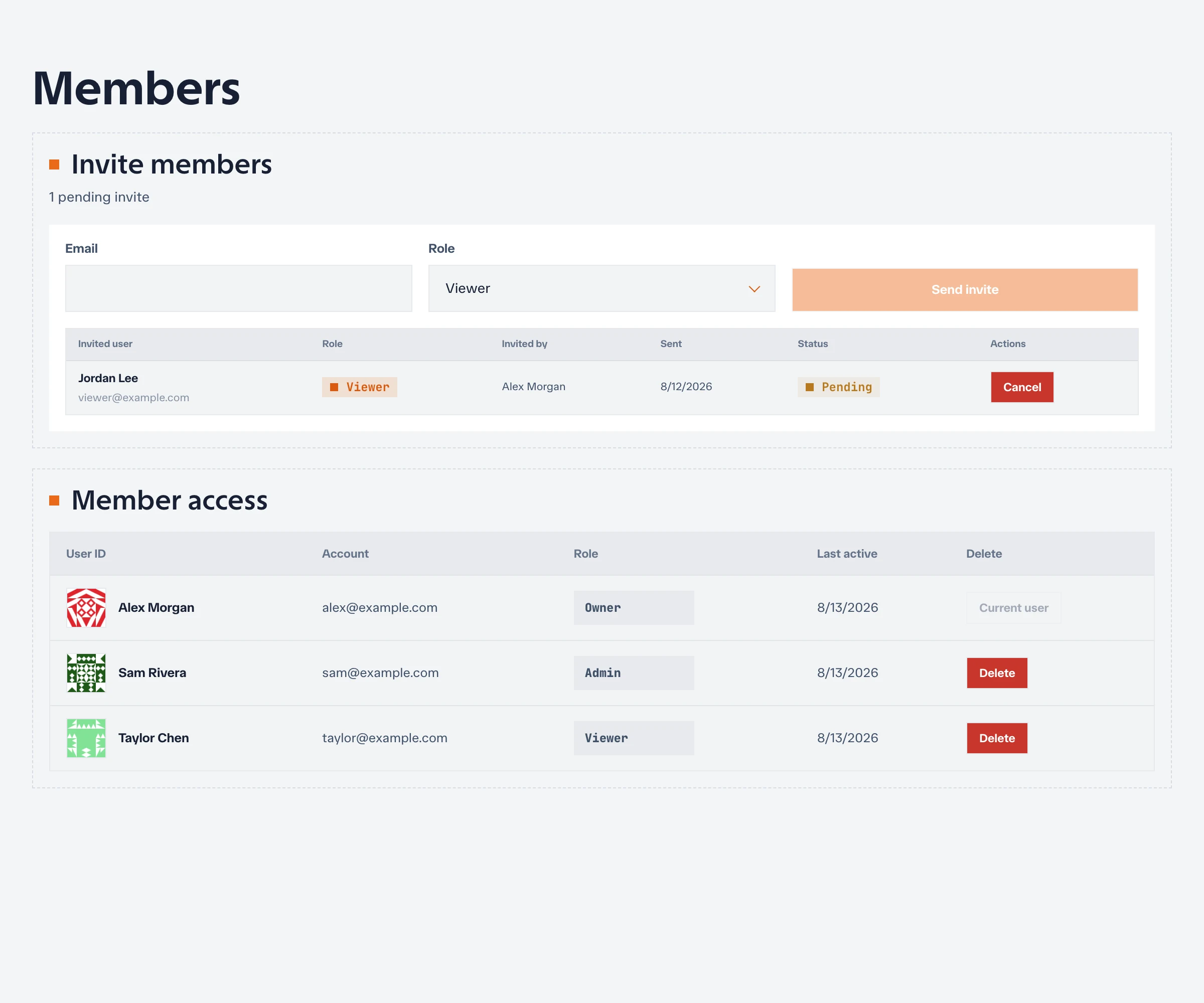
- Enter the person’s email address and choose a role.
- Send the invitation.
An invitation only grants access to the selected project. The recipient must sign in with the invited email address before accepting it.
Project roles
| Role | Intended use |
|---|---|
| Owner | Full project control, including ownership and deletion decisions |
| Admin | Manage project configuration and members without ownership-only actions |
| Editor | Create and update monitoring resources |
| Viewer | Read project configuration, results, and incidents |
Keep at least two owners for production projects. Netstamp prevents removal or demotion of the last owner so a project cannot become unmanageable.
Change or remove access
Owners and authorized administrators can update a member’s role or remove the member from project settings. Review access when responsibilities change, especially for accounts that can edit checks, alert rules, or notification secrets.
Project membership and system administration are separate. A system administrator can manage the Netstamp instance, but still needs project membership to work with project resources.
Update or delete a project
Use Project settings to change project metadata. Changing the slug changes project URLs and can invalidate saved links.
Only an owner should delete a project. Deletion removes the project and its associated monitoring configuration and data, so export or back up anything that must be retained first.
Next, register probes for the project.